

Step 1: Generate Production Batches
CI scores are calculated from batches on your actual and forecast ledgers. Start by generating those batches for the reporting period:- Actual ledger: Generate batches for the reporting period in Production Accounting → [Actual Ledger Name] (e.g. “Gas Injected”)
- Forecast ledger: If configured, generate batches for the reporting period in Production Accounting → [Forecast Ledger Name] (e.g. “Forecast Gas Injected”)
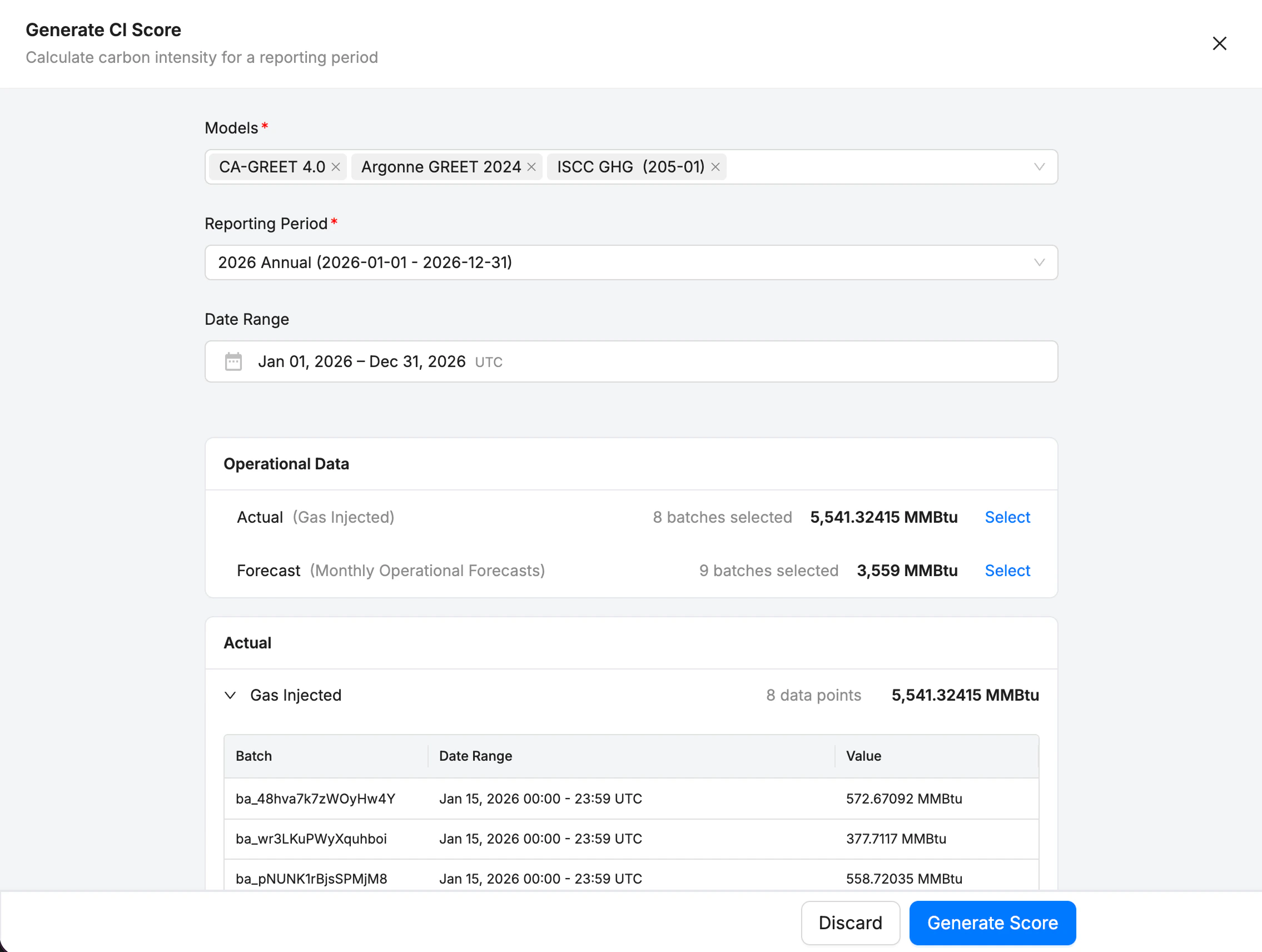
Step 2: Generate CI Score
- Open Production Accounting → CI Scores
- Click Generate Score
- Select:
- Model(s): one or more score models
- Reporting period
- Date range: this gets filled automatically from the reporting period, but user is able to adjust
- Batches: Production Batches get auto-detected within the range, and user can select actual and/or forecast batches to include
- Inputs: the grid lists each operational input the batches you selected supply, with its Value and Source Batch, so you can check them before generating. The grid shows what your batch selection supplies, and the score works its own inputs out when it runs, so the two can differ.
- Click Generate Score to create the score. The models run in the background, and adds a new score at the top of the ledger.
- The latest calculated scores are shown in the project’ overview.