> ## Documentation Index
> Fetch the complete documentation index at: https://docs.mangrovesystems.com/llms.txt
> Use this file to discover all available pages before exploring further.
# Track customer orders
> An order represents a request made by a customer for credit inventory. Each order contains details such as the customer's information, the order terms and status, and the deliveries included in the order.
## Orders
An Order represents a commitment from a Customer to purchase credit units from your projects. Mangrove allows you accurately track orders across all your customers to ensure you have one consolidated view of all the offers and commitments made from the credit inventories of your projects.
An Order serves as a container for one or more Deliveries (separate fulfillments of the order) to the customer. Orders can include deliveries from multiple projects, and do not require all deliveries to be made at once.
The total quantity of an order is the sum of the committed units across all included deliveries, while the total revenue of an order is the sum of the value of all included deliveries.
### Recording an order
Orders can be created in two ways:
* Through the **Orders** Section
* Navigate to a specific customer and initiate a new order within their view
Orders can only be created for existing customers. Ensure that a Customer already exists before creating a new order.
Record the details of the order. For more on specific settings, see the list below.
The status of the order determines whether the included credits are considered fully committed - statuses such as `Draft`, `Expired` or `Cancelled` do not consider their included credits as committed from the inventory. New order statuses can be configured by admins within the Account Admin.
You can choose to record the Retirement Beneficiary details upfront to ensure you can execute future transactions with those details when the credits are available for delivery.
This is a reference to an external identifier. Useful if customers are tracked in a separate system like a CRM. If Mangrove integration is turned on, this order reference is automatically populated.
Document any specific terms such as payment or delivery terms that need to be fulfilled as part of this order.
* In the delivery, **Add Delivery** for each delivery within the agreed upon delivery schedule. Set the estimated date, quantity of units from a specific project.
* Record the price of each delivery, to ensure that the total value of the order is fully tracked.
A project needs to have either existing issued credits, or forecasted issuances of sufficient quantity, for a delivery to be saved from it. If you are having issues creating Deliveries, ensure that the project has sufficient credits to fulfill the delivery.
Mangrove automatically fulfills this delivery with the best available credits from the selected project. However, you have the option to override this by manually selecting the credit issuances to fulfill the delivery with.
- Use **Manually Fulfill Delivery** to specify which credits should fulfill the delivery.
- Enter the quantity from each listed issuance or forecast that you'd like to use
- The total across these quantities is the amount of credits delivered to the customer
You can save documents like contracts and specific customer files specific to each order.
You have agreed to a three-year offtake deal with AcmeCorp, with a commitment to retire credits from multiple projects, twice a year. This order is created in Mangrove under the customer AcmeCorp, with a delivery preference of Retirement. 6 separate deliveries are then added to the order, distributed across the three selected projects.
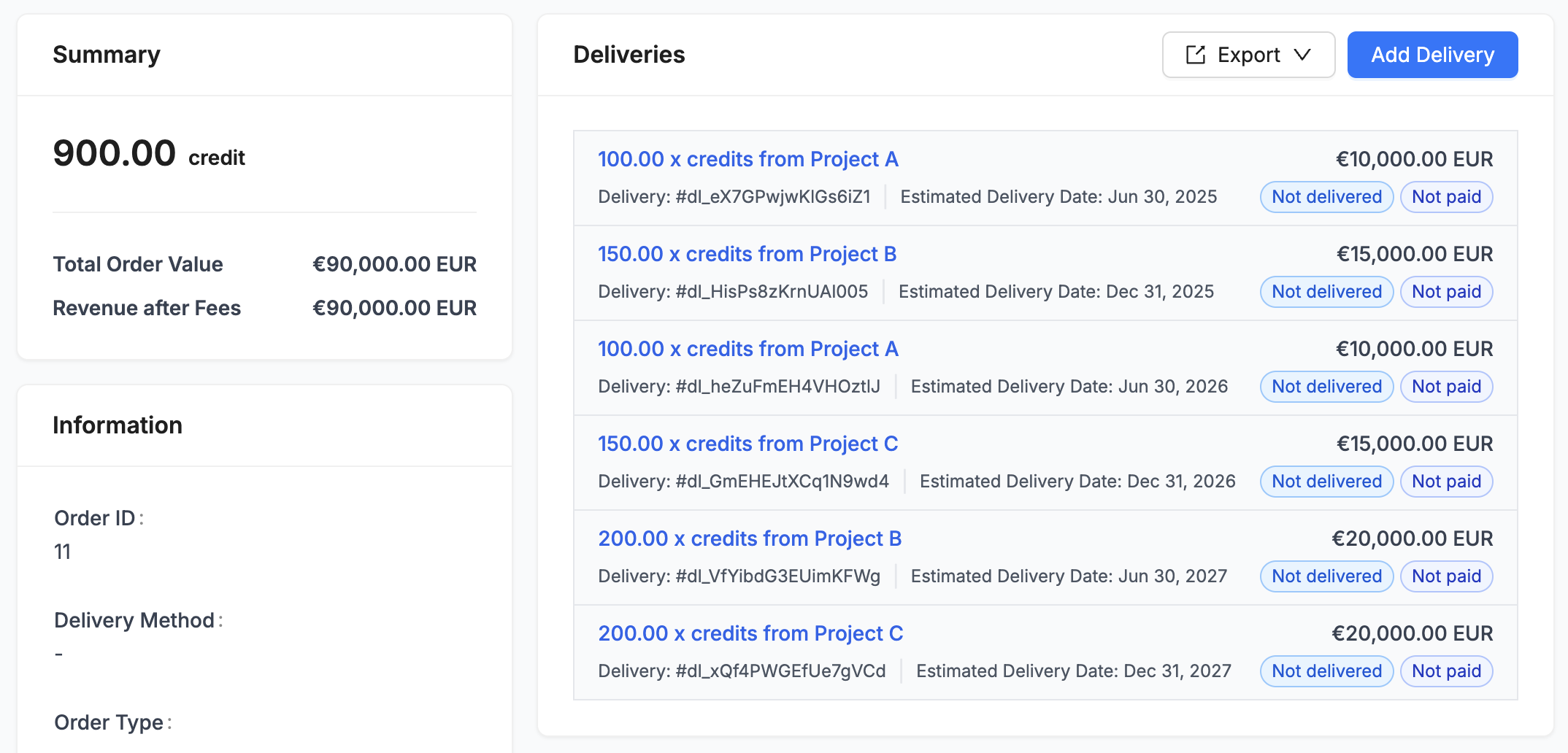 ### Deliveries
Once Deliveries have been created, they can be accessed:
* Within the specific Order
* Within the **Credit Deliveries** of each project
### Customer payments
A payment from a customer can be recorded on each delivery. Payments can be added, edited, or deleted on each delivery.
The Order's payment status summarizes payments across all the deliveries contained in the order. e.g. A `Partially Paid` order has both deliveries that have been paid, and deliveries that have not been paid.
### Deliveries
Once Deliveries have been created, they can be accessed:
* Within the specific Order
* Within the **Credit Deliveries** of each project
### Customer payments
A payment from a customer can be recorded on each delivery. Payments can be added, edited, or deleted on each delivery.
The Order's payment status summarizes payments across all the deliveries contained in the order. e.g. A `Partially Paid` order has both deliveries that have been paid, and deliveries that have not been paid.